How team play is organised
Treasure Hunt can run for individuals or Moodle teams. In team mode, Moodle groups hold the students and groupings connect groups to a road. A road is the route that a team follows; it may differ from another road in stages, location or difficulty. Team progress is shared by the participants in that team.
Set up groups and groupings
- In the Moodle course, create the groups that will play and add participants to each group.
- Create groupings that contain the relevant groups. Give them names that match the planned roads.
- Set the Treasure Hunt activity to team mode.
- Create or validate each road, then assign its grouping. Check that every required road has one.
- Open the activity as a teacher and read the group warning card. Resolve students outside all relevant groups before the activity starts.
Track and support teams
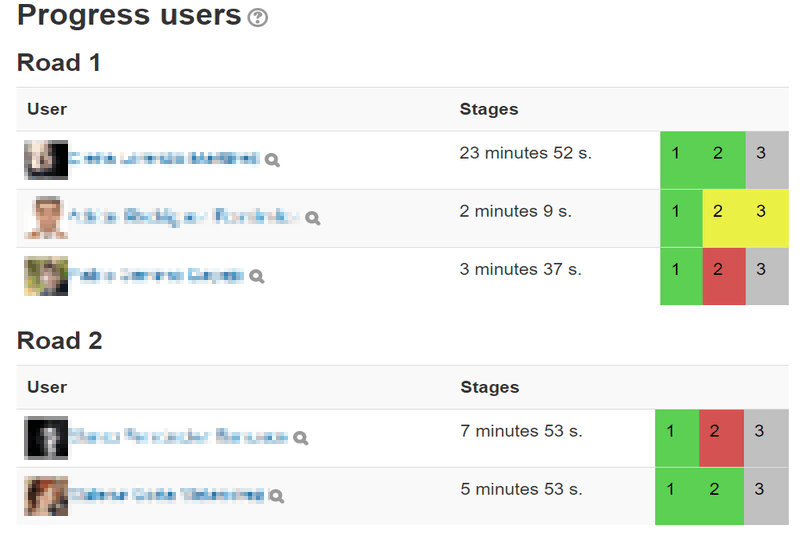
The activity progress list is organised by road and participant sequence. Review attempts, completion and scores to see who needs help. If itineraries are enabled, teachers can examine recorded movements while the game screen is open. Use the road or sequence clear action only when the corresponding run truly needs to be reset.
Enable Show other students progress in the activity settings to add a live progress bar above each road table, in the tracker viewer and at the top of the player. Team markers use a colour and initials; click or tap a marker to read the team name.

- Green marks a passed stage.
- Amber marks a stage waiting for its restrictions.
- Red marks a failed stage.
- A thicker glowing outline identifies your own team.

Designing several roads
Multiple roads can distribute teams across an area, reduce queues at QR points or offer comparable variants. Keep the educational goals equivalent and preview each road separately. The stage editor can copy stages from another road; review copied clues and geometry so the new road remains coherent.